Build your Contabo cloud business inside WHMCS.
Create the catalogue, shape the prices and give customers useful compute and storage workspaces. Connect Contabo service orders to provisioning, customer controls, monitoring and the staff operations that keep the business running.
Look closer. See what you can do.
Look inside the product, explore its capabilities and see how the work comes together.
Your server, at a glance
See the allocated server, resources, power controls, access addresses and recent activity in the customer workspace.
Explore this capabilitySell the infrastructure. Deliver the experience.
Contabo Manager connects the commercial offer, the customer’s allocated resource and the team responsible for operating it. Build a range, follow the order and keep the service useful through everyday controls, storage, monitoring and later changes.
Native catalogue
Create products, groups, configurations and addons from reviewed provider plans.
Commercial control
Choose terms, currencies and price rules with supplier costs and margins in view.
Customer compute
Provide the available power, access, snapshot, recovery and network tools.
Object storage
Offer linked allocations or an independent S3-compatible storage product.
Service growth
Connect addon purchases and guided configuration changes to their order and status.
Operating visibility
Review inventory, incidents, guest metrics, reports and recorded operations.
Build a catalogue customers can actually buy
Bring the commercial pieces of your Contabo range together before the first order arrives. Start with reviewed plans, then shape the product groups, names, descriptions, configurable options and addons your customers will choose in WHMCS. Preview the resulting offers and keep each native product connected to its underlying allocation and pricing rules. For infrastructure you already own, link the resource to the right customer or import the service with its existing contract. The same workspace supports launching a new range and organising the servers your business already operates.
- Native products, groups, configuration choices and related addons
- Previewed starter imports and approved catalogue-source workflows
- Quantity/dependency-aware choices and reusable configuration groups
- Existing-resource binding and native customer-service onboarding
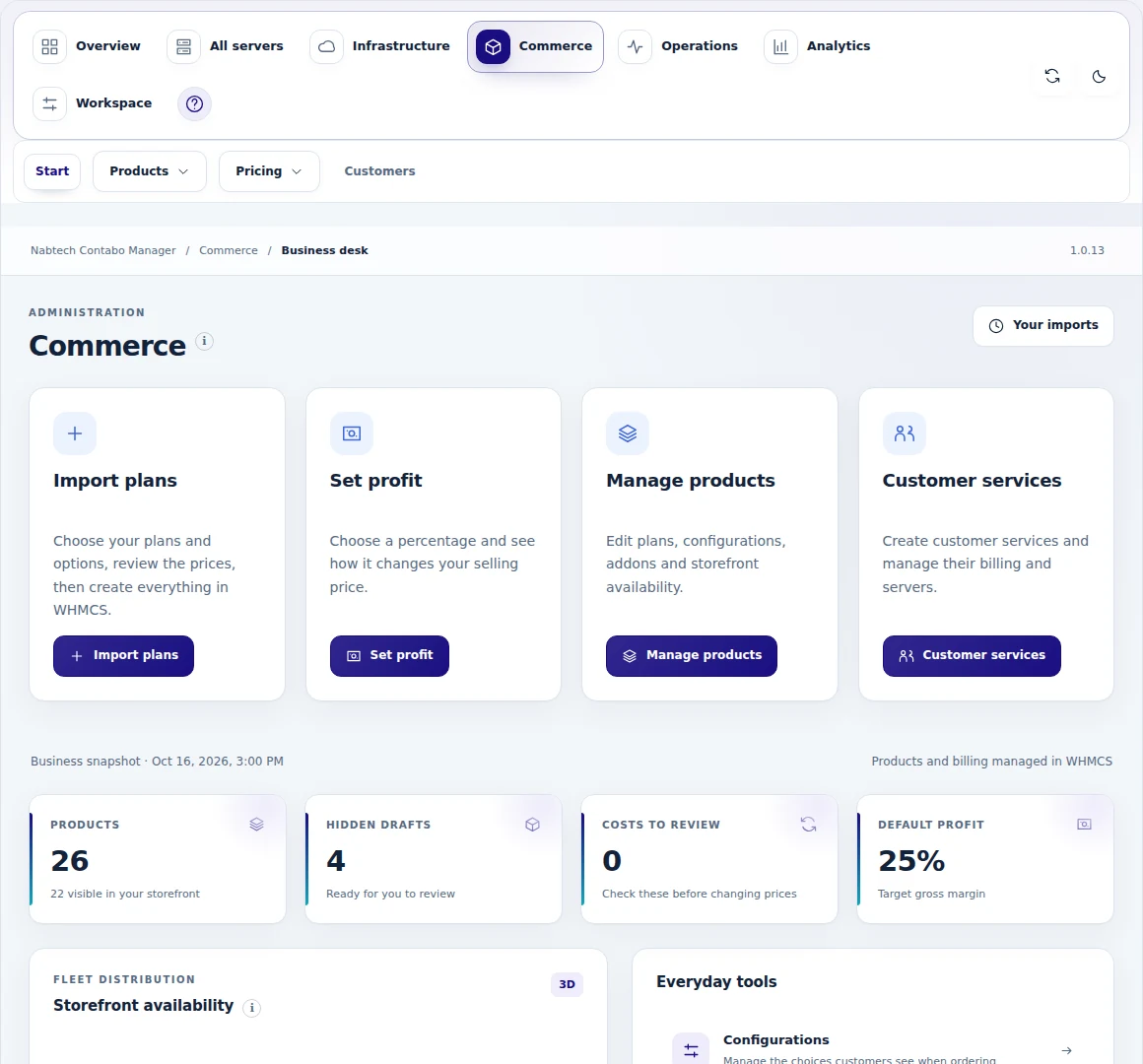
 Review the plans before publication
Give every offer a clear commercial model
A sellable cloud plan needs more than a monthly figure. Set your margin or markup, account for setup fees and paid choices, and decide which currencies and billing cycles belong in your store. Apply shared policies where they make sense, then refine individual products or components when their economics differ. Review the connection between supplier cost, customer price and estimated margin before publishing. When you deliberately change an existing customer's recurring price, use a separate reviewed campaign so the commercial decision has its own schedule and follow-through.
- Margin, markup, manual/fixed prices, buffers and minimum-profit controls
- Selected native currencies and six recurring billing cycles
- Separate component/setup prices and inherited pricing policies
- Reviewed customer-price campaigns and estimated-profit reports
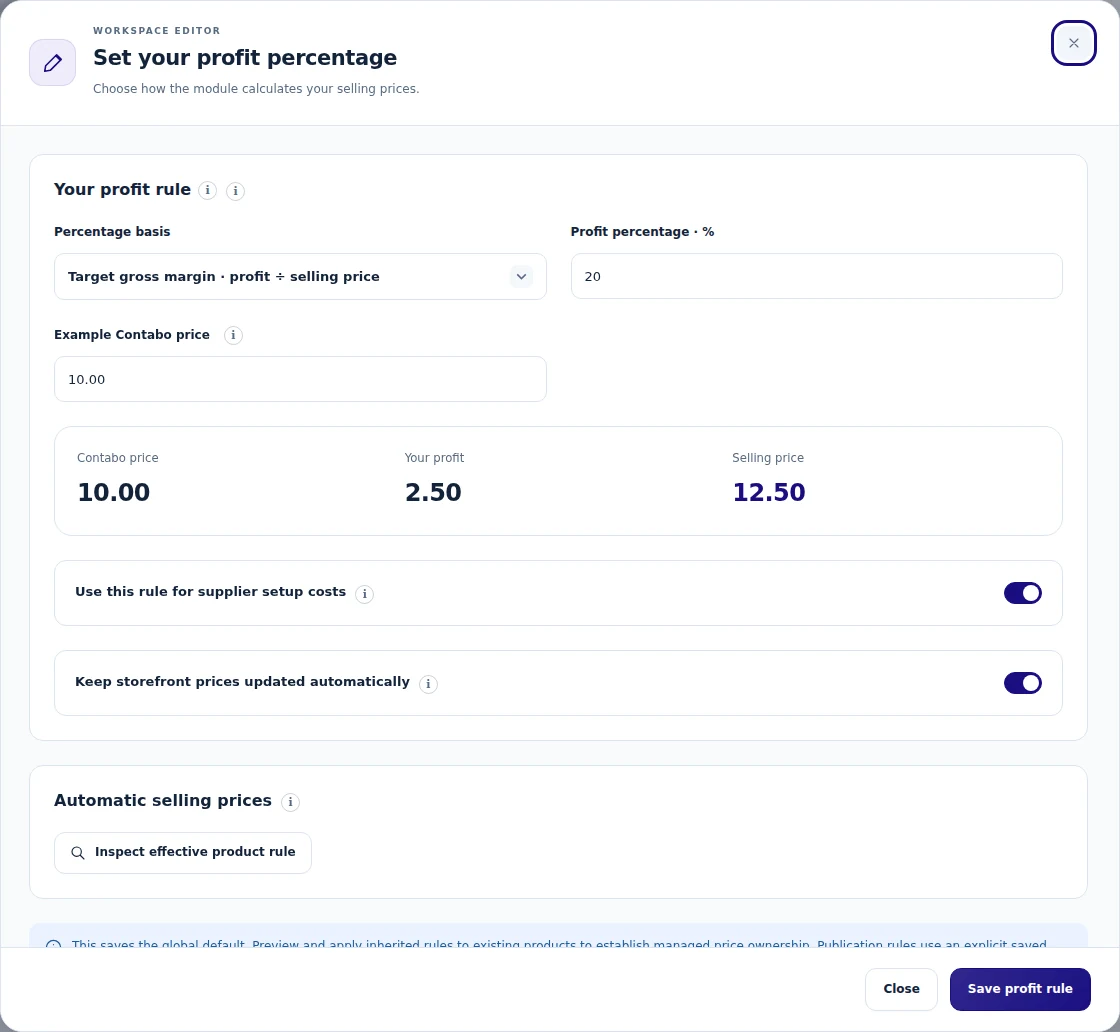
A useful home for every customer server
Give customers a service page they can return to after checkout. The server workspace brings their allocation, connection details, current state and available actions into the WHMCS client area. Eligible servers can expose power controls, snapshot tools, recovery options and activity without making the customer assemble the process from separate messages. Each workspace follows the actual server family and the controls you enable for it. Requests keep a visible result and progress history, helping the customer understand when an action has finished and when the service still needs attention.
- Compact service entry plus a dedicated page in the active WHMCS theme
- SSH/RDP information and eligible power/recovery controls
- Snapshot creation and rollback where supported
- Ownership- and permission-aware actions with recorded progress
Bring networking and DNS into the service
Connect the server to the network work that surrounds it. Manage eligible firewall assignments and rules, private-network membership, reverse DNS and virtual-IP associations from the same service context. Forward DNS has its own domain-verification workflow, allowing a service-owned zone to be created or adopted before its records are changed. Staff can review the effect of a firewall change and reuse a defined preset for a consistent starting point. Customers see the tools allowed for their service, with the relevant network and domain details kept beside the resource they belong to.
- Firewall creation, rule sets, assignments and reusable presets
- Eligible private networks, PTR records and virtual-IP actions
- TXT-based domain ownership verification and zone adoption
- A, AAAA, CAA, CNAME, MX, SRV and TXT record management
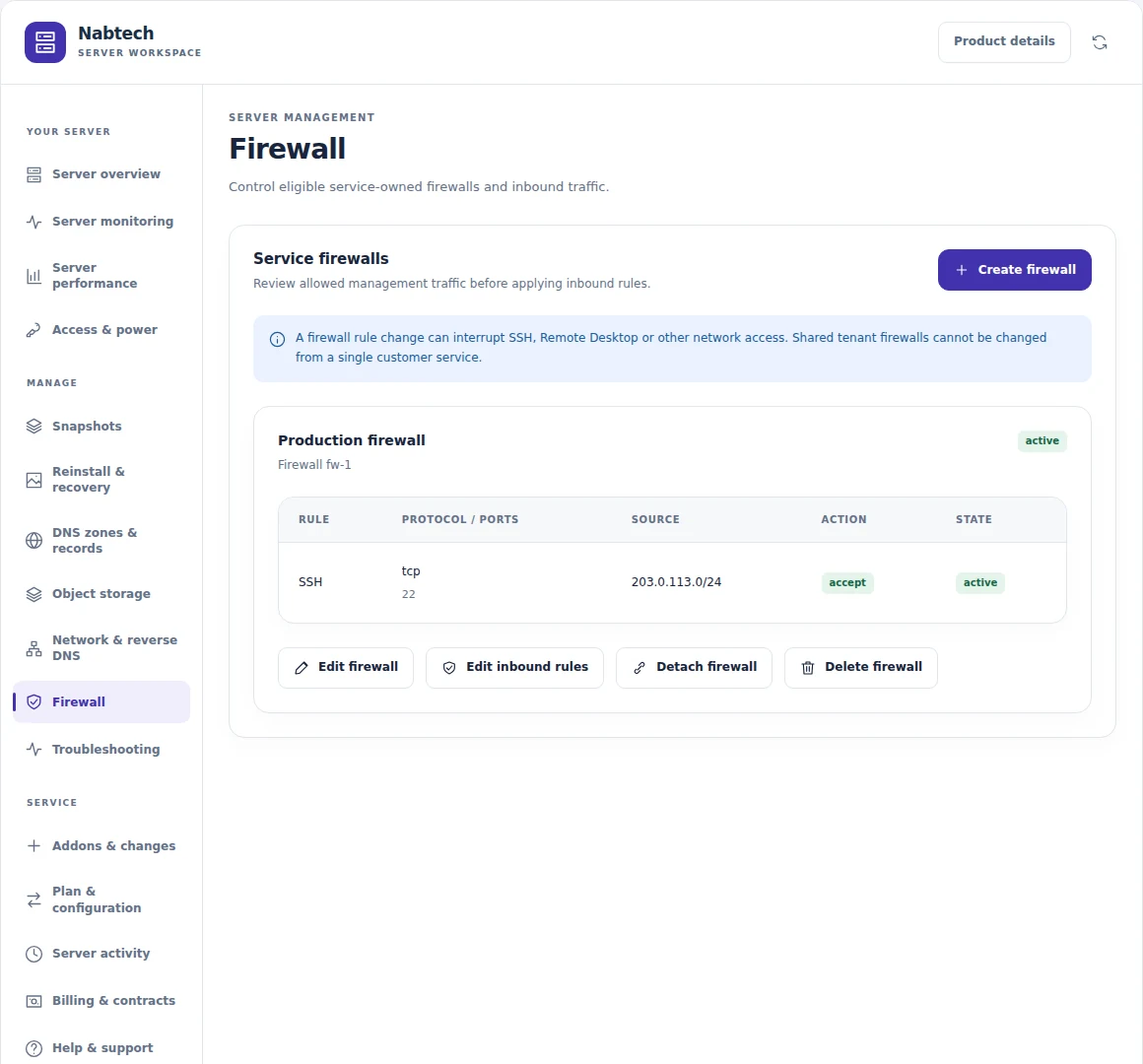
 Review server addresses and networking
Make object storage part of your business
Offer object storage as a service in its own right, or connect an allocation to an existing server relationship. The standalone route brings storage products, capacity, usage and permitted S3 access into a dedicated customer workspace. Linked storage gives the customer a clear view of the allocation attached to their service and a place to request access or a change. Staff can review capacity increases, naming, autoscaling settings and cancellation through the appropriate workflow. Each route keeps the commercial entitlement and the provider allocation connected as the storage service develops.
- Independent native storage products and a dedicated client workspace
- Usage, object counts, endpoint and controlled S3 credential access
- Linked allocations with customer requests and staff resolution
- Reviewed capacity increases, autoscaling and scheduled cancellation
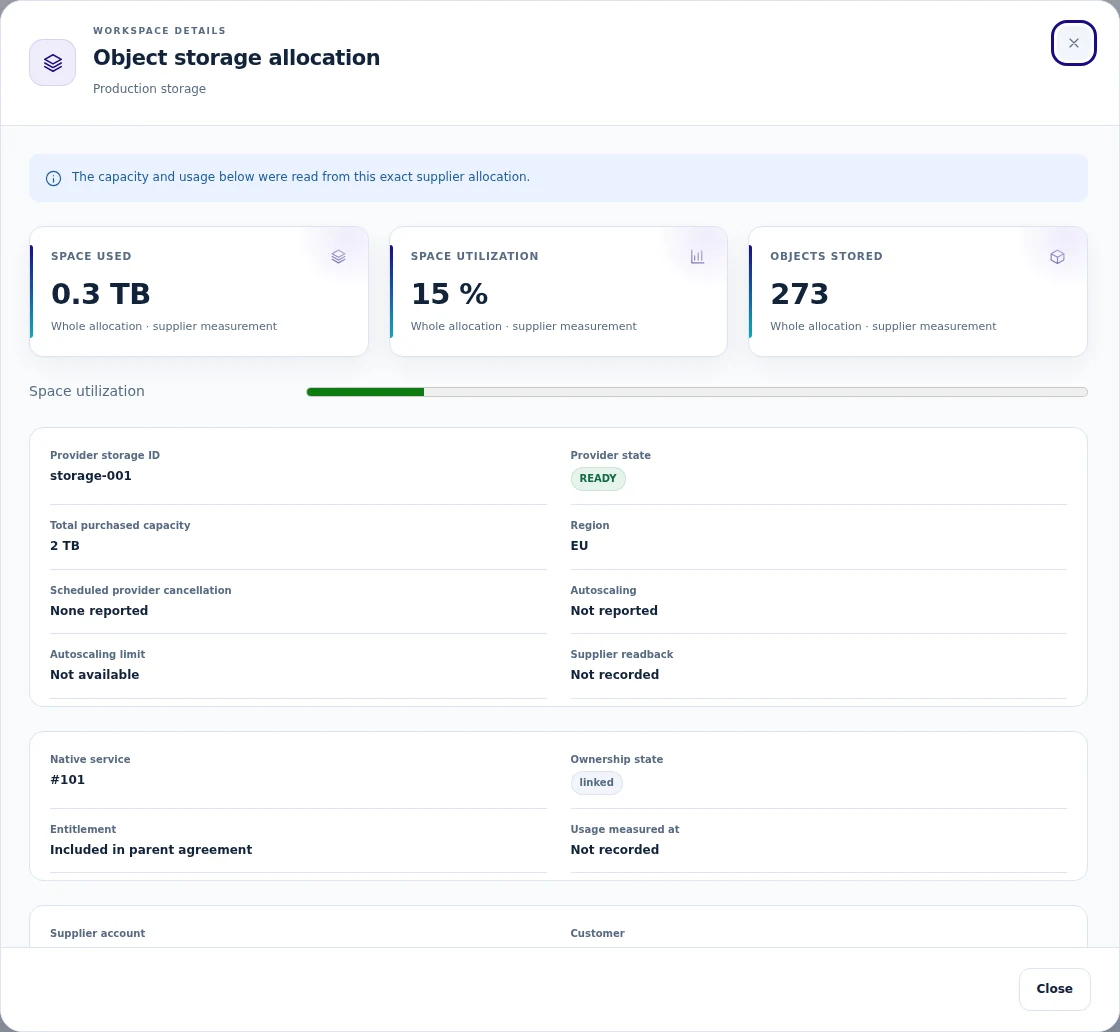
 Link object storage to the business
Let services grow with the customer
Give existing customers a clear route to the next service they need. Compatible addons can be reviewed from the customer workspace and ordered through WHMCS, with their own details, payment and delivery status. Infrastructure plan changes follow a guided request: review the quote, let the team confirm the supplier change, and complete the corresponding native upgrade after verification. Customers can see the request and staff can follow its progress. The result is a more complete account experience, with new purchases and operational changes connected to the service already in use.
- Service-aware addon choices and native addon orders
- Current purchased-addon details and recorded delivery progress
- Eligible offer lookup and native upgrade quotation
- Assisted supplier-first plan/configuration changes with staff review
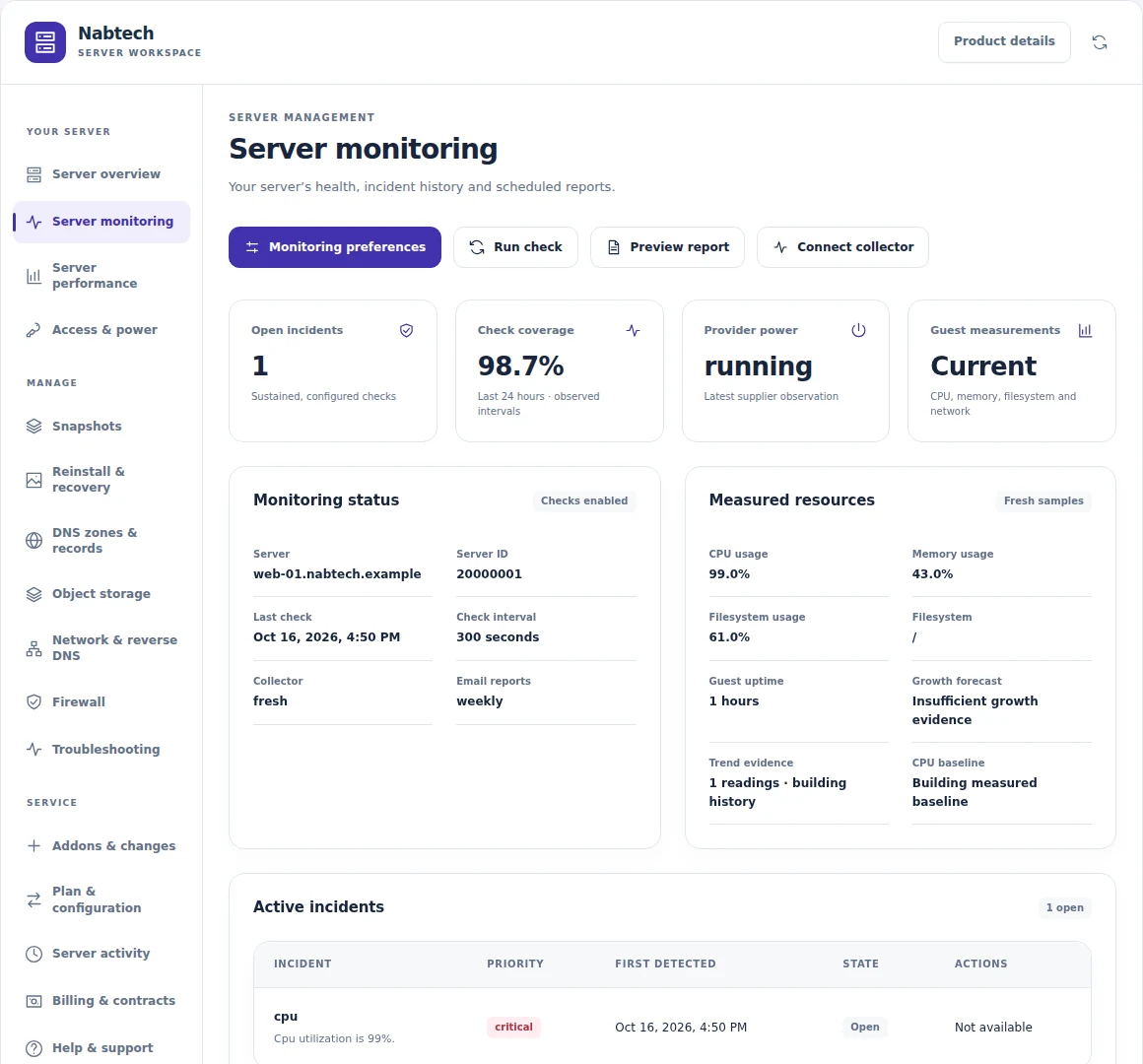
Understand service health and resource use
Build an operational picture from the signals available for each server. Combine provider state and selected TCP checks with guest CPU, memory and disk measurements when you install the optional collector. Configure thresholds, maintenance periods and alert priorities, then follow incidents through acknowledgement and recovery. Reports can give staff and customers a useful view of the period they care about, with customer preferences for supported schedules. Freshness remains part of the picture, so a missing sample or an unavailable supplier check can be understood in the context of the service.
- Supplier-state and configured public-address TCP checks
- Optional signed Linux/Windows guest telemetry
- Incidents, acknowledgements, maintenance and recovery handling
- Priority-based alerts and daily/weekly/monthly report preferences
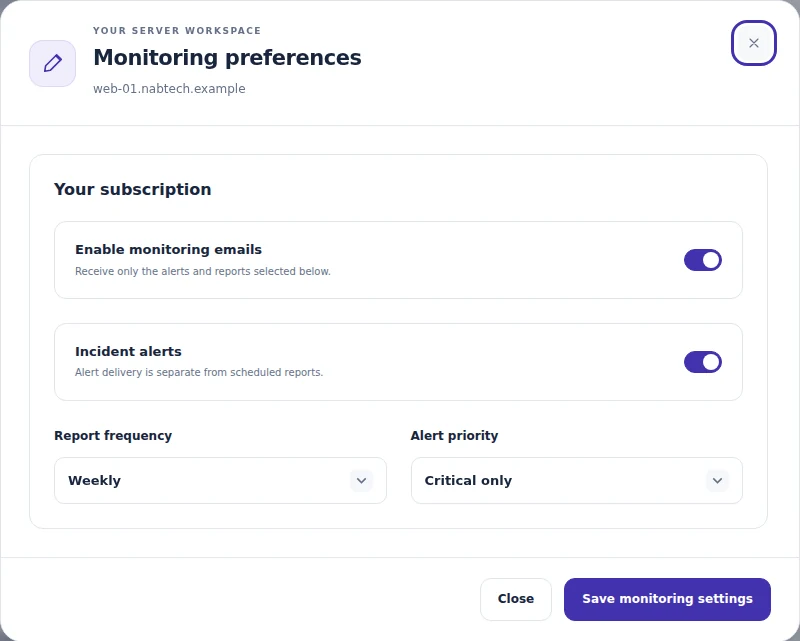 Choose server monitoring preferences
Keep the operational follow-through visible
Orders and server actions do not always finish at the moment a button is pressed. Give your team a shared place to follow the request, inspect its status and resolve the next step. The suite advances authorised actions, keeps background work organised and retains the context needed to reconcile an uncertain result. Dedicated-server requests can move through a staff fulfilment process alongside the rest of the business. Role and action controls shape who can make changes, while reports and notifications help the team focus on services, commitments and tasks that need attention.
- Recorded operations, background follow-up and explicit recovery paths
- Dedicated-server and other assisted fulfilment workspaces
- Scoped administrator roles and action permissions
- Operational reports, native-email notifications and audit context
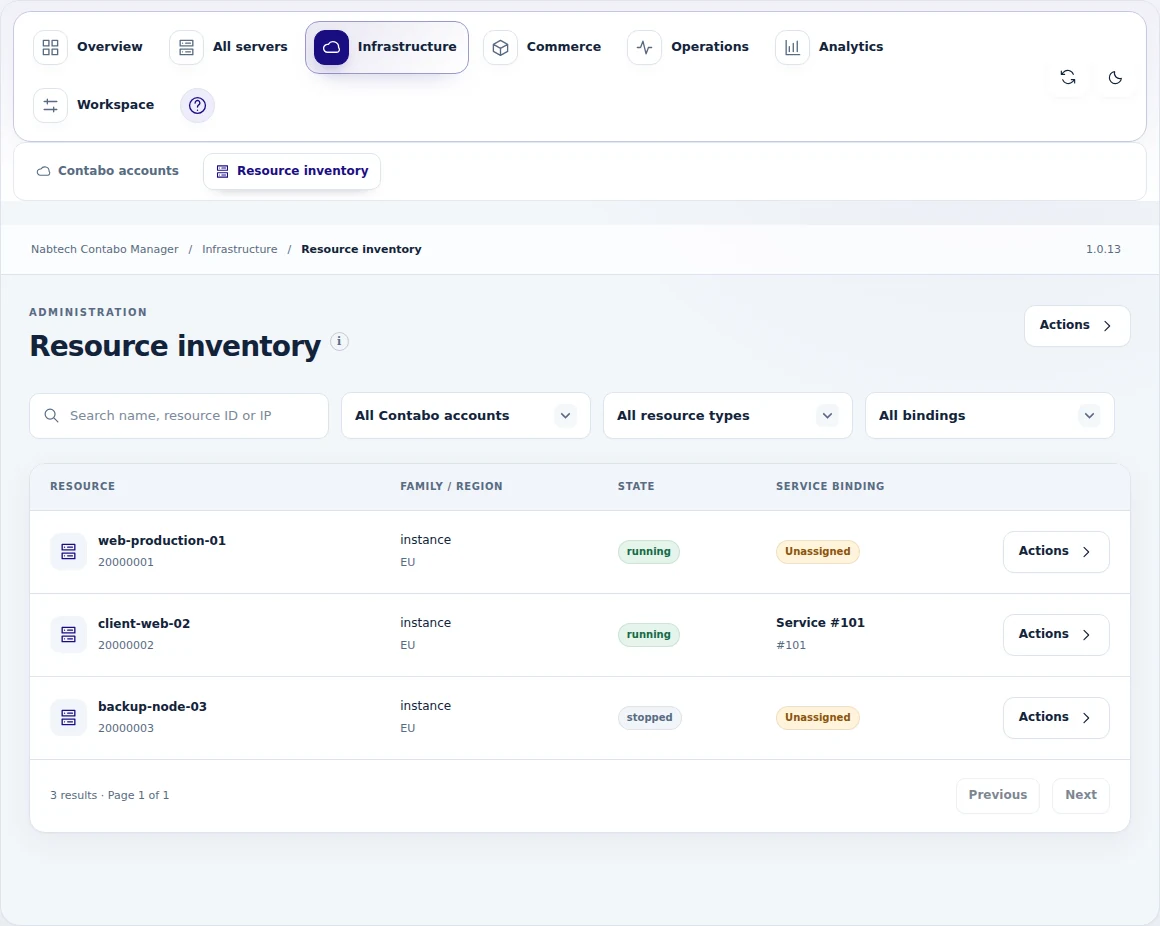
 Review the managed server estate
Bring the servers you already operate into WHMCS
Bring your existing Contabo infrastructure into a customer service your team can manage in WHMCS. Start with the account inventory, identify the exact server and choose its customer and mapped product. Bind it to an existing service, or use the guided import to create a native service with the billing contract you have reviewed. Dedicated-server records can join the inventory through the staff-managed registration workflow.
For an existing ContaboVM installation, the migration workspace previews the association changes for selected services and records the completed handover. Customer prices, billing dates and payment subscriptions remain attached to those contracts. Your team gains a clear connection between the customer, their native service and the infrastructure already serving them.
- Account inventory linked to the exact customer and service
- Owned-server import with reviewed prices, dates and addon contracts
- Supported ContaboVM migration with preview and rollback review
- Staff-managed dedicated-server records and resource associations
Add domain sales to your Contabo offer
Enable the optional registrar workflow when domain sales belong in your Contabo business. Review standard TLD costs, apply your margin or markup and preview the one-year registration, transfer and renewal prices created in WHMCS. Registration and transfer orders stay connected to the native customer, domain record and selected Contabo account, giving the commercial and service teams a shared place to follow them.
The relationship continues after registration. Customers can use the supported nameserver, contact and transfer-code tools, while domain and transfer synchronization brings supplier status and expiry into WHMCS. Supplier-confirmed renewal dates provide the evidence for the next registration year, and permitted cancellation follows the recorded end date.
- Reviewed standard TLD prices with margin or markup
- Native one-year registration and transfer workflows
- Nameserver, registrant-contact and transfer-code management
- Domain status, transfer progress and supplier-expiry synchronization
A closer look at what’s included.
Explore the tools inside Contabo Manager, grouped around the work they help you do.
Commerce and catalogue
- Connected accounts and starter catalogue
- Native products, groups and configurable options
- Related addons and billing-term variants
- Reviewed source updates and import history
- Existing-resource binding and service import
Prices and contracts
- Margin, markup and manual-price rules
- Currency, rounding and profit floors
- Shared and per-offer price policies
- Reviewed recurring-price campaigns
- Supplier-term and subscription context
Compute workspaces
- Eligible power and rename actions
- Supported reinstall, rescue and access tools
- Snapshot creation, labeling and restore
- Custom-image choices
- Customer activity and service records
Network services
- Firewall assignment and rule review
- Private-network relationships
- Supported PTR and virtual-IP tasks
- Domain verification and service DNS zones
- Records and provider troubleshooting
Storage and growth
- Linked object-storage allocations
- Independent S3-compatible storage services
- Capacity, usage, endpoint and access views
- Reviewed addon purchases
- Guided plan and storage changes
Monitoring and operations
- Provider-state and TCP checks
- Optional Linux/Windows guest collector
- Incidents, priorities and scheduled reports
- Assisted infrastructure tasks and recovery
- Commercial reporting, branding and help
From the first action
to a useful outcome.
Follow the tasks inside Contabo Manager. See which tools come into play and what the finished workflow delivers.
Launch a server range
Turn infrastructure choices into a coherent offer customers can purchase.
Explore the interface- Connect the Contabo account and review available plans
- Select terms, prices and customer-facing options
- Preview the native WHMCS product result
- Publish the range and follow service provisioning
Give a customer useful server control
Keep routine customer work connected to the resource they own.
Explore the interface- Open the allocated service workspace
- Review the available power, access and recovery actions
- Manage the permitted snapshot or network task
- Follow activity and monitoring for the service
Add an object-storage service
Present storage as a service with its own customer and operational context.
Explore the interface- Choose a linked allocation or standalone storage product
- Review its capacity and commercial terms
- Complete the corresponding order or request
- Manage usage, endpoint and permitted access
Connect the account and curate the offer.
Review provider inventory and the service families you want to sell. Build the catalogue with your prices and customer choices, set the permitted controls and connect monitoring and operating responsibilities to the service.
- Connect the account and review inventory
- Choose catalogue plans, terms and price policies
- Set customer controls and service options
- Configure monitoring, reports and staff workflows
Try Contabo Manager free for 7 days.
Explore the module with the workflows that matter to your business. Explore a catalogue preview, inspect a customer server workspace and review the storage and monitoring tools. Use the seven-day trial to get familiar with the experience, then continue with an annual licence when you are ready.
- Start your 7-day module trial
- Configure the features you want to explore
- Follow a practical customer or staff workflow
- Continue with the annual licence
See what’s new.
Explore new capabilities, improvements and fixes. Every published release includes its version, date and change details.
Keep up with Contabo Manager.
Open the changelog to read published release notes and explore the product’s development over time.
Contabo Manager Answer Studio
Good questions.
Better answers.
Explore what Contabo Manager can do, how it fits your WHMCS, and the details that matter before you get started.
Tell us what you want to offer your customers. We can help you explore the capabilities and plan your next step.
Contact Nabtech ↗01What does Contabo Manager handle?
The suite covers catalogue and native product creation, retail pricing, service orders, customer compute and storage workspaces, and staff operations. It also includes existing-resource onboarding, network and DNS tools, monitoring, addons and guided service changes for the supported Contabo families.
02Can I bring existing resources into the workspace?
Yes. Inventory discovery and binding let staff associate an existing resource with the correct account, customer and contract. Reviewed native-service import and the scoped migration workflow help bring an installed customer base into the same service and operational experience.
03What can customers do with their servers?
The available controls follow the allocation and your policy. Supporting services expose power actions, access and recovery tools, snapshots, firewalls, private networking and address-related tasks. The customer workspace keeps those actions beside service information, activity, billing context and help.
04Does the storage service work independently of a server?
Yes. The suite supports linked object-storage allocations and independent S3-compatible storage products. The standalone workspace includes the service’s capacity, usage, endpoint and permitted access information, while storage changes follow the relevant request and operating workflow.
05How do plan changes and addons work?
Customers can review available addons and create eligible native addon orders. Plan and configuration changes use a guided quotation and staff fulfilment workflow, keeping the customer’s requested offer, payment and infrastructure change connected. Storage changes have their own corresponding service process.
06What does monitoring show?
Monitoring combines the available provider-state, TCP and incident information. The optional Linux or Windows collector adds guest CPU, memory and disk samples. Alert priorities, recipients and daily, weekly or monthly reports let the team choose how service updates are delivered.
07Can I try the module before buying?
Yes. Start the seven-day free trial of Contabo Manager and explore the features through a workflow relevant to your business. The trial page explains the terms and starting steps. The annual licence is available when you decide to continue.
08Where can I see product updates?
The current version is shown on this page, and the Changelog opens the release notes. Each published release explains its new capabilities, improvements and fixes. You can read the notes in the page or open the full release history when you want to follow the product over time.
09Can I choose exactly which Contabo plans appear in my store?
Yes. Start with the plans available to your connected account, then choose the range you want to offer. Contabo Manager helps create native WHMCS products, groups, configurable choices and related addons, with a preview of the resulting offer. You can review the names, terms and options before publishing the customer-facing catalogue.
10Can I set my own margins, setup fees and billing terms?
Yes. Pricing tools include margin, markup and manual prices, alongside separate setup and component prices. You can choose the native currencies and recurring billing cycles used by your offer, apply shared policies and refine individual products. Supplier cost, retail price and estimated margin stay available for review before you publish.
11How do I review price changes for customers who already have a service?
Existing customer price changes have a separate reviewed campaign workflow. When you decide to change recurring charges, the team can review the intended campaign, its schedule and follow-through. This keeps a deliberate change to a customer's contract distinct from maintaining the catalogue prices used for new offers.
12Can different staff members have different operating responsibilities?
Yes. Administrator roles and action permissions let you shape who can carry out the supported operating tasks. Recorded requests, activity and follow-up give the team a shared history of the work. Customer actions are also tied to ownership, service eligibility and the controls you enable for that resource.
13Can customers manage DNS records for a domain they own?
The forward-DNS workflow includes TXT-based ownership verification before a service-owned zone is created or adopted. Customers can then use the record tools permitted for their service, including supported A, AAAA, CAA, CNAME, MX, SRV and TXT records. The zone stays connected to the service, giving the customer and staff a clear place to manage its DNS work.
14Can the team reuse a firewall setup across services?
Reusable firewall presets provide a consistent starting point for eligible services. Staff can review the rules and the effect of a change before applying the relevant assignment. The available actions still follow the actual Contabo resource and enabled controls, so a shared preset can be reviewed in the context of each customer's service.
15How does the module help the team manage maintenance and incidents?
You can configure monitoring thresholds, maintenance periods and alert priorities, then follow incidents through acknowledgement and recovery. Provider state, configured TCP checks and optional guest measurements contribute the signals available for that service. Their freshness remains visible, helping staff distinguish an incident from a missing sample and give the next action the right priority.
16Can I add domain sales to my Contabo offer?
Yes, through the optional registrar workflow for supported Contabo domain services. Review standard TLD costs, apply margin or markup and preview one-year registration, transfer and renewal prices in WHMCS. Native domain orders retain their customer and selected Contabo account associations, so staff can follow the domain sale alongside the customer's other services.
17What happens after a customer registers or transfers a domain?
For supported domains handled through the optional registrar, customers can use the available nameserver, registrant-contact and transfer-code tools. Synchronization brings provider status, transfer progress and expiry information into the native WHMCS domain record. Renewal dates follow supplier confirmation, keeping the customer's domain history connected to the actual registration period.
18Can I manage dedicated servers that need staff fulfilment?
Yes. Dedicated-server records can enter the inventory through a staff-managed registration workflow, and assisted requests have their own fulfilment workspace. The team can keep the customer, resource association, request status and next action together. This is useful when delivering the service requires an operator to complete and confirm the supplier work.
19What happens when a server action takes time to finish?
The operation retains a recorded request and progress history while the authorised work continues. Background follow-up and staff recovery tools help the team inspect the outcome and resolve an uncertain result. Customers can follow the available activity for their service, with the action kept in context until its status has been established.
20Can object-storage capacity grow after a customer signs up?
Storage changes have a reviewed service workflow for capacity increases and the applicable autoscaling settings. Staff can assess the requested change against the customer's allocation and commercial entitlement, then follow it through the corresponding operating process. The available change route depends on whether storage is linked to another service or sold as a standalone product.
No questions match that search. Try a different word or explore all topics.
See the difference.Try it in your WHMCS.
Give Contabo Manager a place in your WHMCS. Start a seven-day free trial and explore the capabilities that matter to your business before buying.