Make every consent choice clear.
Design the banner, explain the categories and give visitors a useful preference centre. Manage your WHMCS consent experience and connected websites from one workspace, with activity views that help your team understand how the interface is being used.
Look closer. See what you can do.
Look inside the product, explore its capabilities and see how the work comes together.
See consent activity across connected websites
Open the combined dashboard for impressions, saved preferences, essential-only choices and tracked events alongside the daily trend.
Explore this capabilityDesign, explain, connect and understand.
Give the consent experience the same care as the rest of the website. Consent Hub brings visual controls, clear category wording, visitor choices and connected-site reporting into a workspace your team can maintain over time.
Design the interface
Start with a preset and shape the banner and preference centre in the live preview.
Explain the categories
Edit the opening message, action labels, policy link and category descriptions.
Support visitor choice
Offer accept-all, necessary-only and custom preferences with saved selections.
Connect the websites
Enable the WHMCS presentation and connect approved HTTPS sites to the same settings.
Apply category choices
Associate prepared optional resources with the visitor preference they should follow.
Review the activity
Explore the overall trend and look closer at a selected website, page or event.
Start with a design. Make it yours.
Choose a starting design that suits the website, then make it feel like part of your brand. Consent Hub provides twelve presets and a Design Studio for layout, placement, button style and spacing. Adjust the colours, typography and preference-centre treatment while reviewing the banner and expanded interface together. A wide bar, compact card and centred presentation can each serve a different page composition. The controls stay in WHMCS, so the person responsible for the visitor experience can refine the design without reopening the site's theme files for every change.
- Twelve starting presets and eleven layout families
- Position, entry treatment, spacing and button controls
- Colours and typography for banner and preference centre
- Combined live preview
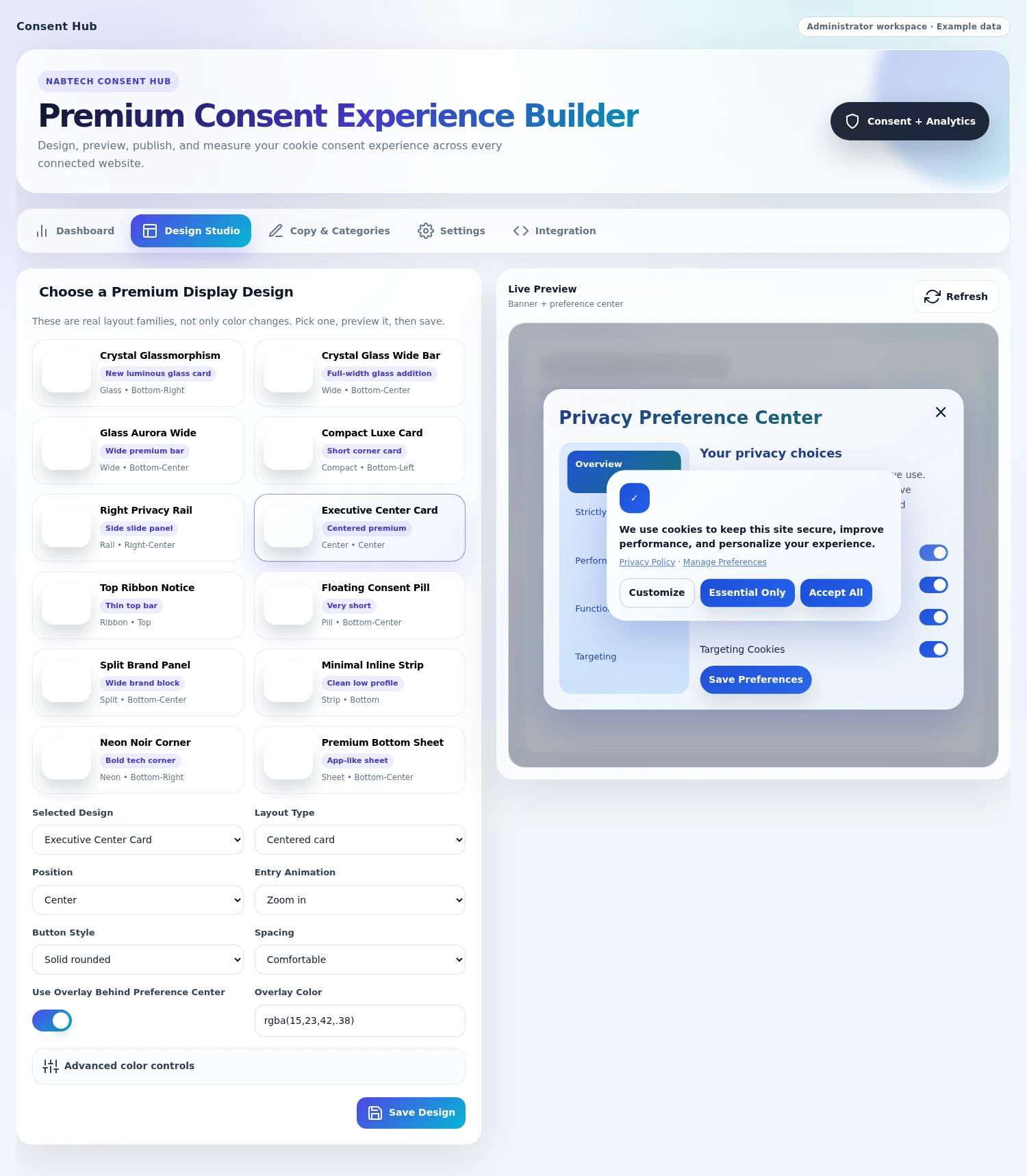
 Adjust layout, placement and entry treatment
Give every choice a useful explanation
Use the words your visitors need at the moment they make a decision. Edit the opening message, action labels and privacy-policy link, then explain the built-in categories inside the preference centre. An overview introduces the experience, while necessary, performance, functional and targeting sections give each choice its own space. The category labels and descriptions are maintained in one editor, helping your team keep the banner and expanded explanation consistent. When the wording needs to change, update it from WHMCS and carry the message through the connected interface.
- Editable banner and action copy
- Policy URL and link wording
- Overview and built-in category explanations
- One place for routine content changes

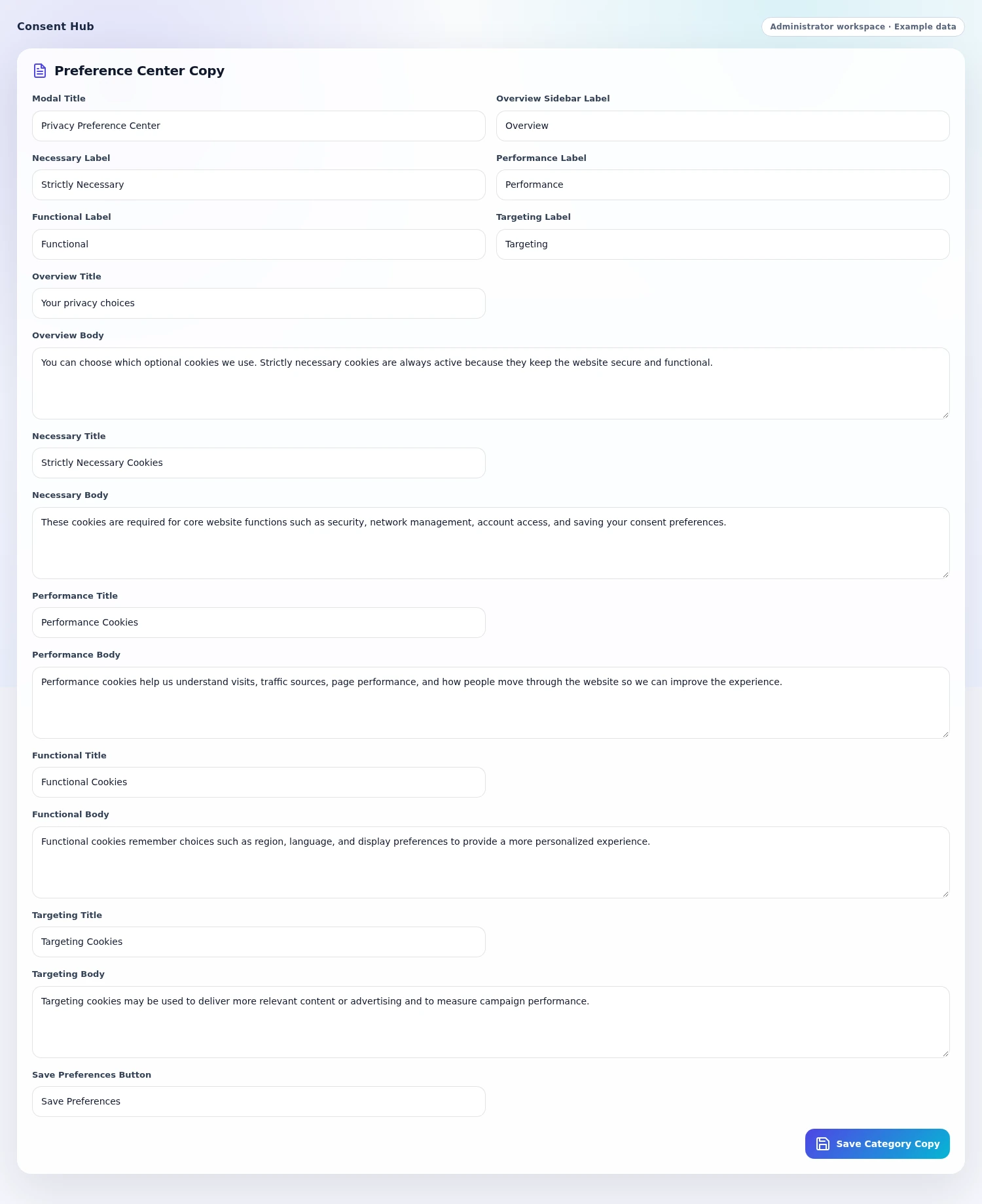 Explain the preference centre in your own words
Make the visitor journey easy to follow
Give visitors a clear route from the first message to a saved preference. The banner offers the main actions and a link to the site's policy. Those who want more detail can open the preference centre, read the category explanations and save their selections. Necessary operation stays available, while the other built-in categories carry the visitor's chosen state. The interface stores the resulting preference and can restore an available unexpired choice on a return visit. This makes the banner, the detailed explanation and the website's integrated category behavior parts of one journey.
- Accept-all, necessary-only and customize paths
- Category explanations beside the controls
- Saved choices and expiry handling
- Available stored-preference restoration
Connect your client area and related sites
Bring the consent experience to the places your visitors actually use. Enable the WHMCS client-area interface when you want it, add approved HTTPS websites and copy the integration snippet for their initial setup. Connected widgets draw on the hub's published appearance and wording, giving your team a central place to maintain those choices. The website list stays visible in Settings, while Integration provides the snippet and direct addresses needed to connect a site. After setup, routine design and copy changes can remain with the same team working in WHMCS.
- Separate WHMCS client-area display control
- Add/remove connected HTTPS websites
- Copyable integration snippet
- Central appearance and wording configuration
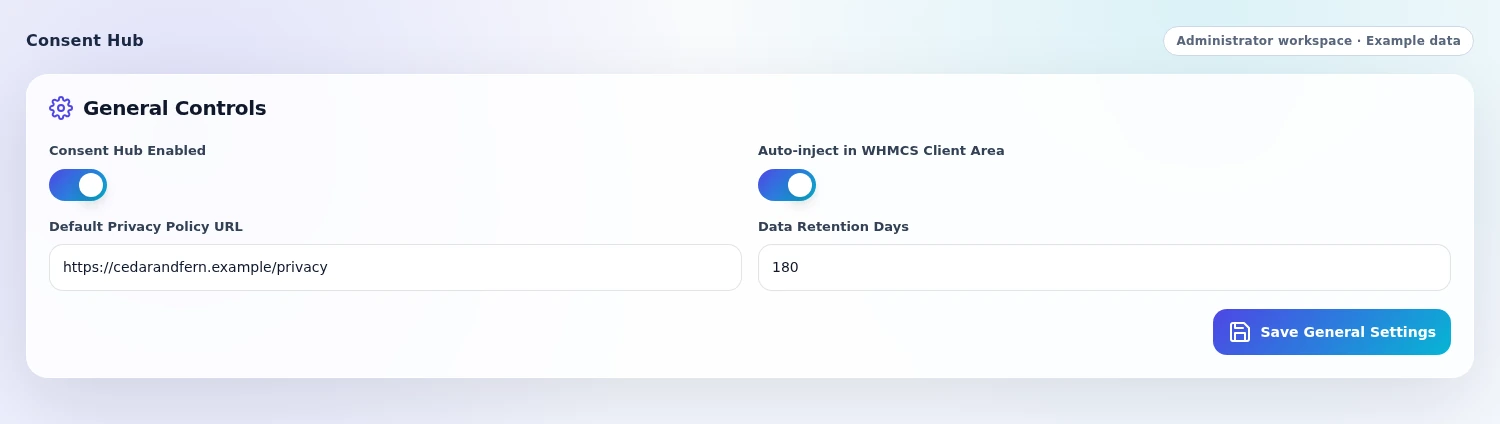
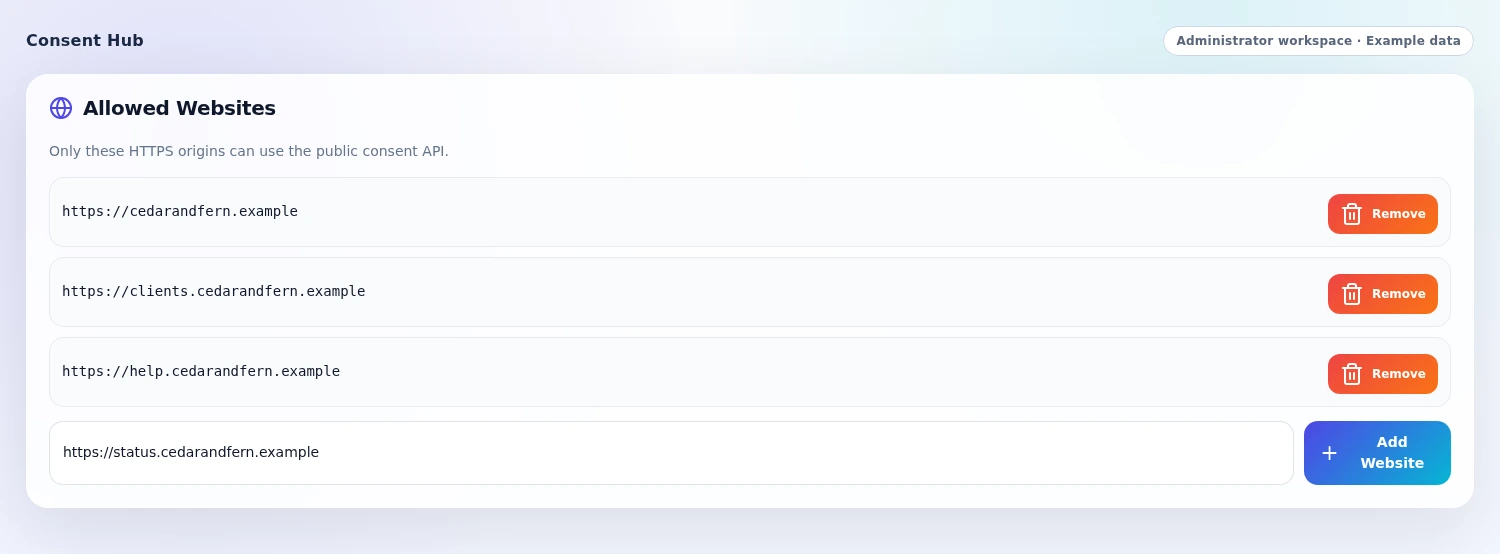 Connect another website to the hub
Connect category choices to your website
Make the preference interface part of the site's loading setup. During integration, optional scripts and resources can be associated with the category they belong to, so prepared resources wait for the corresponding choice and become available when it permits them. The widget also includes recognition for common analytics and marketing script patterns and watches for elements added during the visit. This gives your technical team a practical connection between the categories visitors see and the resources the website uses, while the ongoing wording and visual presentation remain manageable in the addon.
- Category-associated scripts and resources
- Release of prepared resources when permitted
- Recognition of common script patterns
- Integration work separated from routine design/content editing

See the overall picture, then one website
Open the dashboard to understand how the consent interface is being used. The combined view brings recorded activity together, with a recent-period trend, preference funnel and category-choice information. Select a connected domain to look at that site's activity in the same layout, then use page, event-type and recent-event context to explore it further. These views give your team a practical way to review the experience after publication. You can relate the message and design you manage to the interactions the hub records, without moving between separate reporting screens for every site.
- Global and selected-domain views
- Recent 30-day trends and preference funnel
- Category on/off information
- Page, event and available country context
Carry saved choices into the next visit
Give returning visitors continuity in the experience they have already chosen. Consent Hub checks for an unexpired preference before presenting the banner, using the website's stored choice and the available hub record. Where a shared preference can be restored, a visitor can move between approved connected websites with the same category selections.
The restored choice is also used by the site's prepared category-based resources, connecting the remembered preference to the loading behavior your team configured. Each saved choice carries its issue and expiry dates, and the interface presents a fresh choice when an available valid preference cannot be found. For a hosting business, this helps the public website and client area feel like parts of one considered visitor journey.
- Return-visit checks for available, unexpired saved choices
- Local and hub-based preference restoration
- Shared category selections across approved connected websites
- Remembered choices applied to integrated category-based resources
A closer look at what’s included.
Explore the tools inside Consent Hub, grouped around the work they help you do.
Design Studio
- Twelve starting design presets
- Eleven layout families
- Placement, entry and button choices
- Spacing, colours and typography
- Banner and preference-centre live preview
Copy and explanation
- Opening banner message
- Action labels and policy destination
- Preference-centre overview
- Necessary, Performance, Functional and Targeting labels
- Editable category descriptions
Visitor experience
- Accept-all and necessary-only actions
- Custom category selection
- Necessary operation retained
- Saved preference and expiry handling
- Available preference restoration on return visits
Website connections
- Independent WHMCS client-area display
- Approved HTTPS website list
- Generated initial integration snippet
- Central published appearance and copy
- Browser and hub preference handling
Resources and reporting
- Prepared category-associated optional resources
- Common analytics and marketing pattern recognition
- Combined and selected-domain dashboards
- Recent activity trend and preference funnel
- Category, page and event context
From the first action
to a useful outcome.
Follow the tasks inside Consent Hub. See which tools come into play and what the finished workflow delivers.
Publish a brand-matched consent design
Keep routine visual changes with the person managing the visitor experience.
Explore the interface- Choose a preset in Design Studio
- Adjust the layout, placement, colours and typography
- Review the banner and preference centre together
- Save the design for the connected presentation
Give a visitor an informed choice
Connect the opening message, detailed explanation and saved selection.
Explore the interface- Introduce the banner and policy destination
- Open the preference centre for more detail
- Read the category explanations and choose optional categories
- Save the preference for the website’s integrated behavior
Review a connected website
Look at the overall experience and individual site activity in the same workspace.
Explore the interface- Open the combined activity dashboard
- Select the website to focus the view
- Review the trend, category choices and recent events
- Use page and event context to understand the recorded journey
Shape the experience, then connect the websites.
Set the appearance and wording in WHMCS, choose where the interface should appear and add the approved websites. Connect each external site with the supplied snippet and associate its optional resources with the relevant categories during setup.
- Design the banner and preference centre
- Write the opening message and category explanations
- Enable WHMCS and connect approved websites
- Prepare optional resources and review visitor activity
Try Consent Hub free for 7 days.
Explore the module with the workflows that matter to your business. Create a banner design, explore the preference journey and review the activity views for a connected website. Use the seven-day trial to get familiar with the experience, then continue with an annual licence when you are ready.
- Start your 7-day module trial
- Configure the features you want to explore
- Follow a practical customer or staff workflow
- Continue with the annual licence
See what’s new.
Explore new capabilities, improvements and fixes. Every published release includes its version, date and change details.
Keep up with Consent Hub.
Open the changelog to read published release notes and explore the product’s development over time.
Consent Hub Answer Studio
Good questions.
Better answers.
Explore what Consent Hub can do, how it fits your WHMCS, and the details that matter before you get started.
Tell us what you want to offer your customers. We can help you explore the capabilities and plan your next step.
Contact Nabtech ↗01What can I change in the consent design?
Design Studio provides starting presets, layout families, placement, entry treatment, button styles and spacing. You can adjust colours, typography and the preference-centre appearance while reviewing both the banner and expanded interface in the live preview.
02Can I edit the banner and category wording?
Yes. Edit the opening message, action labels, privacy-policy destination and preference-centre overview. The built-in Necessary, Performance, Functional and Targeting categories each have editable labels and descriptions, so visitors can read the explanation beside the choice.
03What choices do visitors receive?
Visitors can accept all categories, keep necessary operation only or open the preference centre to make a custom selection. Necessary operation remains available. The widget saves the resulting preferences and can restore an available unexpired choice on a later visit.
04Can I use Consent Hub on websites beyond WHMCS?
Yes. Add approved HTTPS websites and use the generated snippet for their initial connection. Those widgets draw their published appearance and wording from the hub. WHMCS client-area display has its own control, so you can manage where the presentation appears.
05How do website resources follow a visitor’s choice?
During integration, optional scripts and resources can be associated with the relevant consent category. Prepared resources wait for a permitting choice, and the widget includes recognition for common analytics and marketing script patterns. Your team can then maintain the ongoing wording and design from WHMCS.
06What does the dashboard show?
The dashboard brings recorded activity together with a recent-period trend, preference funnel and category-choice information. Select a connected domain for its own view, then explore recent events and the available page, event-type and country context.
07Can I try the module before buying?
Yes. Start the seven-day free trial of Consent Hub and explore the features through a workflow relevant to your business. The trial page explains the terms and starting steps. The annual licence is available when you decide to continue.
08Where can I see product updates?
The current version is shown on this page, and the Changelog opens the release notes. Each published release explains its new capabilities, improvements and fixes. You can read the notes in the page or open the full release history when you want to follow the product over time.
09Do routine consent-copy changes require another theme edit?
After the website is connected, your team can maintain the banner message, action wording and category explanations in WHMCS. Connected widgets draw on the hub's published configuration. This keeps routine content changes with the person responsible for the visitor experience, while the initial site connection and resource preparation remain part of setup.
10Can I keep the opening banner compact and provide more detail in the preference centre?
Yes. Choose a compact layout and concise opening message, then use the preference-centre overview and separate category descriptions for fuller explanations. Design Studio lets you review the banner and expanded interface together. Visitors can see the main actions quickly and open the detail when they want to understand each choice.
11Can connected websites use the hub while the WHMCS client-area banner is switched off?
Yes. WHMCS client-area display has its own control, separate from the approved HTTPS website list. You can connect the external sites that should use the hub and choose whether its interface also appears in WHMCS. The central appearance and wording settings remain the place to maintain that presentation.
12Will a returning visitor have to repeat the same preference choice on every visit?
Consent Hub checks for an available, unexpired saved preference before presenting a fresh choice. When that preference can be restored, the visitor's category selections continue into the website's prepared resource-loading setup. If an available valid preference cannot be found, the interface presents the choice again.
13Can a saved preference continue across approved connected websites?
Where the shared preference is available to restore, the hub can carry the visitor's category selections between approved connected websites. Local and hub-based preference handling support that continuity, and the restored choice is used by each site's prepared category-based resources. This helps related websites offer a consistent returning-visitor experience.
14Can visitors allow functional features while keeping other optional categories off?
Yes. The preference centre lets visitors choose the built-in optional categories individually and save their selection, while necessary operation remains available. A visitor can therefore allow the Functional category while leaving Performance or Targeting off. Prepared website resources follow the relevant category choice established during integration.
15Can the consent setup handle optional resources added after the page opens?
The widget watches for elements added during the visit as part of its resource handling. Prepared optional resources can be associated with a category and released when the visitor's choice permits it. This supports websites whose optional content appears later, with the category association established as part of the site's integration.
16Can visitors reach our full privacy policy from the banner?
Yes. Set the policy destination and the wording of its link in the content controls. The banner can introduce the choice and provide that route to the full policy, while the preference centre gives visitors the shorter overview and category explanations they need beside the controls.
17Can I review one website's consent activity without combining it with the others?
Yes. Select a connected domain to focus the dashboard on that website's recorded activity. You can review its trend, category choices and recent events in the same layout used for the combined view. This lets the team examine a particular site's experience while still having access to the overall picture.
18Can I see where consent interactions are taking place on a website?
Page and event-type context help you explore the recorded interactions, with recent events available for a closer look. Start with the selected website, then review the pages and actions represented in its activity. This gives the team useful context for assessing the wording and presentation visitors encounter.
19How does the preference funnel help us understand the visitor experience?
The recent 30-day dashboard brings banner impressions, saved choices, necessary-only actions and preference-funnel stages into the same view. Read those measures alongside category on/off information to understand how the recorded choice journey is being used. They give your team practical context when reviewing the design and explanations.
20Can we choose how long analytics activity is retained?
Yes. Settings includes an analytics retention period used for recorded event and feedback cleanup. Your team can set the history period it wants to maintain for reviewing the experience. Saved visitor preferences have their own issue and expiry handling, keeping the remembered choice separate from the dashboard's activity history.
No questions match that search. Try a different word or explore all topics.
See the difference.Try it in your WHMCS.
Give Consent Hub a place in your WHMCS. Start a seven-day free trial and explore the capabilities that matter to your business before buying.